Showing posts with label books. Show all posts

Saturday, April 4, 2009

Turtle Soup

I have finally gone and finished mom's other book, Turtle Soup.
I'm not entirely sure what it will be about...
She wanted me to do it like I did The Privateer.

The resolution on the image she has for this is way smaller than the other... This one actually fits on the screen... I cut the size of the original Privateer in half, and it is still significantly bigger... strange...

Luckily, This one was much better quality.

Here's her piece about it from her website...

Sea turtles may be endangered but after an encounter with marine biologist, Jack Brandon, nothing will stop Sara Hart from naming her deli, Turtle Soup. When Jack takes a job at the nearby Georgia Aquarium, Sara finds the environmental poster boy at her door, hungry and carrying a chip on his shoulder. Neither thinks the other has what it takes, until a scuba class reveals what lies beneath the surface. It will take food, friends, and a little help from Mother Nature, to help them see that making a difference isn’t all numbers and glory. It must begin with love.

I did it basically the same way I did the other...
I love the gradient I found for this...
I took the one from Happy To See You and I shifted the hue down halfway toward green and orange.

If you're curious about the method, it's relatively the same, so see The Privateer.

I must note, though, that moving the text to the spine was way harder, particularly the title.
I had to sit and rub with a tiny clone stamp, brush, and eraser for ages after I used select>color range... Where it touches the turtle, the colors are too close and it gets nasty.
I had to modify the spine lots, too. I couldn't just stretch the edge of the image. I did, but I had to battle hair and turtle to make them the right color, and make it all shades of green.

I love this one... I'm proud of it. I think I'm getting better.

Monday, March 23, 2009

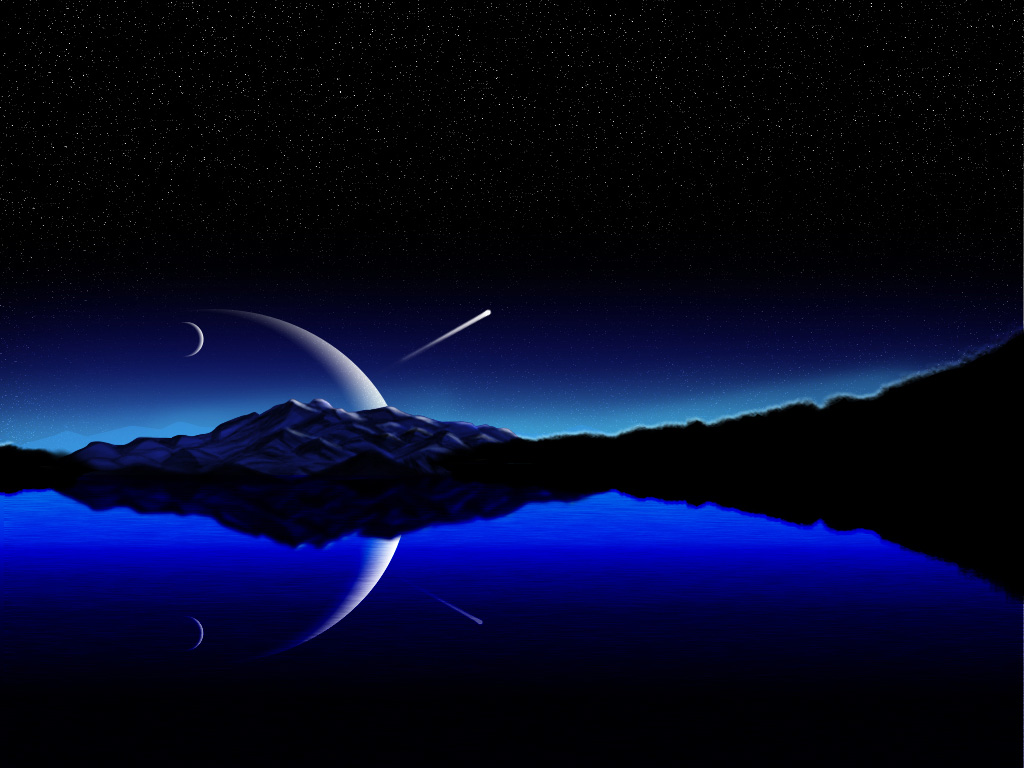
Photoshopping From Scratch: Starry Scene

I did a from-scratch (i.e. "real") piece of digital art the other day from that night sky tutorial I mentioned a little while ago. It took FOREVER.
I'm kinda burned out now.
Here's what the tutorial showed:
This is the one that I was supposed to imitate. Considering I did my own thing, not attempting to follow fully, I think in some respects I did a better job.

I do think he did better with the mountains, but mine aren't to shabby, considering the level of difficulty. If you go and look at the actual images, the resolution is different. His is only 1024x768 (4:3), and mine is 1440x900 (8:5/widescreen).


This is mine. His is "Night Sky". This I call Starry Scene. Unfortunately, the stars don't show out in this scaled-down image. I think you can click on it to see the full-size.
There are all kinds of differences. I added a displacement map for the water, which makes mine appear more realistic close-up, imho.
I thought his stars were a little rough, so mine are softer.
I like the elements in mine being more centered. Plus, his light-blue distant mountains seemed kinda fake - I faded mine - I almost removed them completely. My glow is lower, too.
Also, I colored the tree edges green, so on closer inspection you'd see that it's not just a black smudge - they are tree branches.


...
My mom's about to get a lot of website attention, and someone else wants to sell her book, thinking the image I did was of a real book! Well, They're a normally only-print company, and are making an exception in her case. I guess they like my pic!

Well, as her radio interview comes out the 7th, She wants me to help with a website tweak, as well as do the same for Turtle Soup that comes out in August that I did with The Privateer.
I'm excited to help. At least somone's cashing in on my ability...

Friday, March 20, 2009

Doing a Book (In PhotoShop)

Well, My mom has a book she's published coming out soon, and it's being sold online as an e-book, maybe/maybe not in print later.

For those interested in the book itself, it's about 18th century naval battles, I think. I haven't read it yet, but I hope to soon. It sounds pretty good. It comes out April 17th. You can find more at my link "mom's books" to the left, or just click here.

She wanted me to do an illustration of a book for it, rather than just the flat image someone threw together for her as a cover.

This is it.

I honestly had a moment of frustration when I first saw it way back when. I could have done a better job than whoever she paid to, had I had a source photo of such a boat. I just didn't help her because I didn't know where to find one.


I could do better water, better clouds, better lighting... It's not that bad, though. Still... I feel kinda dumb. I need to get better at finding source pics.


Here is my book. Or her book. Or whatever.
This isn't one she's using, but it's my presentation of it. She preferred a plain white background.

What I did was use free transform to give perspective. I moved a duplicate right and down once, then duplicated that a couple times with ctrl+alt+shift+T on the same layer. That made a front cover, with thickness.
I duplicated all of that and moved it left and up to be the back cover.

Then I used the single-column marquee tool to select the edge of the front and transformed it to make the spine. I put a low-opacity fill over it to make the spine different and darker and less striped from the stretch.
I copied the text from the original with color select, and used it on the spine via transform.

The pages was the tricky part. I finally ended up deciding to just do a carefully crafted white shape. I cut triangles out along the back page corners. You can't see it in this scaled-down image.

Last, I played. I found a nice gradient, I did a reflection, and I added mild shadows and lighting. I think it's a job well done!